Showing posts with label Google. Show all posts

Monday, August 25, 2014

Google Slides App For iOS

Image Source
Google continues to make the Google Apps For Education suite more iPad friendly as the Google Slides app for iOS debuted to the masses today! Slides along with Google Drive, Sheets, and Docs have enabled iPad users to tap into the collaborative power of Google apps like never before on iPads.

Google Slides has also added new features and options that were not available previously when accessing Google Slides via the Chrome iOS browser. Users can now create presentations on the iPad rather than being limited to just viewing them as well as continuing to work on presentations offline and having the new content sync back up once connected to wifi again.

These changes make using Google Slides more friendly than ever for schools and districts going 1:1 with iPads.


Friday, October 11, 2013

EdCampMSP

Kudos to Osseo for organizing and hosting EdCampMSP tomorrow!
Image Source

Looking forward to chance to get together with instructional technology leaders, gurus, and advocates from other districts and finding out into what's happening their other places and tapping into their experiences and expertise.

Monday, September 23, 2013

EdCamp MSP

Image Source
Do you live in central Minnesota and want to get together with other educational colleagues and educational technology advocates to build a collaborative, constructivist unconference schedule?

Sign up for EdCampMSP hosted by Osseo on October 11.

Thursday, June 13, 2013

Google Translate Makes Blog Content Language-Friendly

Have you ever wanted to be fluent in a foreign language?  Well now you can be!

Not by spending  hours listening to self-paced Rosetta Stone language lessons or by living in a foreign country with a host family.  Thanks to a Google widget you can install in your blog layout, you can instantly become fluent in multiple foreign languages with the click of a simple drop-down menu widget that makes it quick and simple to translate the text content of your blog post on Google Blogger to another language.


You can quickly revert to the original language of your blog, especially if you're not as fluent as you used to be in the translated language and don't quite remember the original content of your blog, by simply clicking the X at the top right corner of your blog.


Imagine having a collaborating classroom partner in another country with students who speak an entirely different language than your own students do.  Now your students can easily use Google Blogger to create a blog of classroom writing and connections that can become instantly multi-lingual with a click of the Google Translate button, making the experience much more personalized for the collaborating classroom students while enabling global connections.

Saturday, April 6, 2013

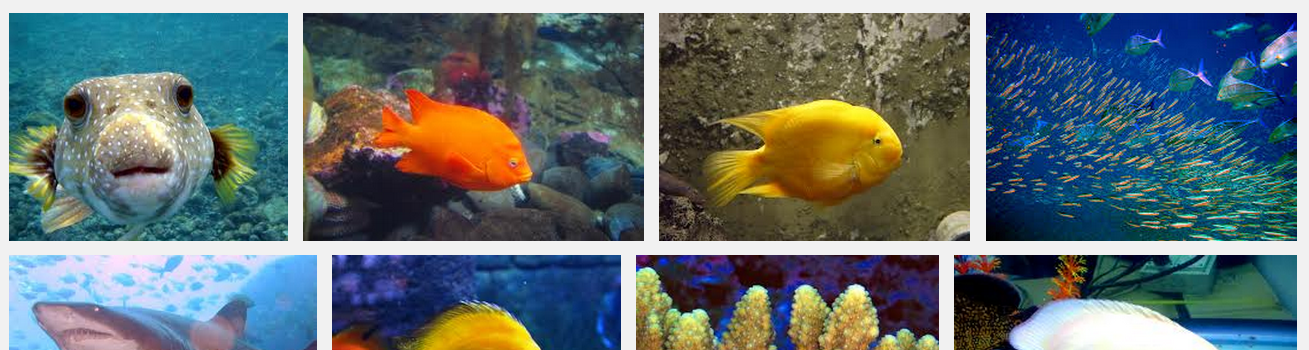
Finding Creative Commons Licensed Images On Google Images

Image
How many times have you heard someone say that any images listed on Google are completely free to use because they are posted on the internet, right?  Not necessarily.

Here are some quick tips on how to find copyright friendly images on Google Images.


Searching For Creative 
Commons Licensed 
Images On Google Images


Pictures and images on Google.com are copyrighted by the owner even though they are published on the web.  One of the safest ways to use them in your work is to search for Creative Commons licensed images that give you the rights to repost and modify images as long as you give credit to the owner.

Here’s how to find images posted with Creative Commons licensing on Google:

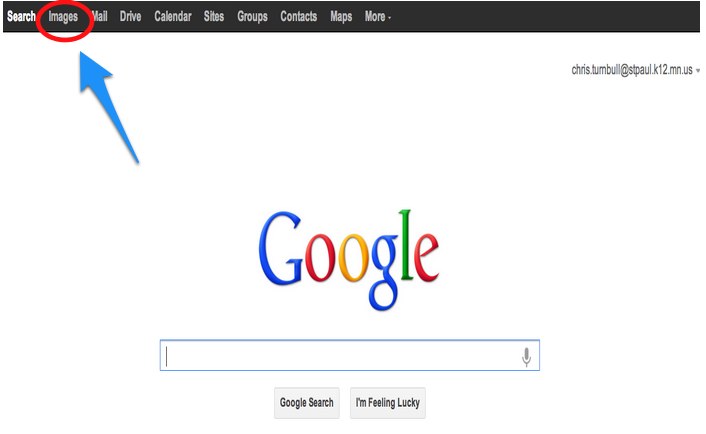
1. Go to Google - https://www.google.com/ and click Images in the Google toolbar.

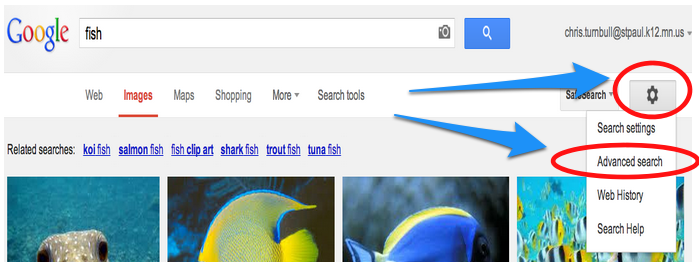
2. Type in your search topic and click the gear icon to Advanced Search options

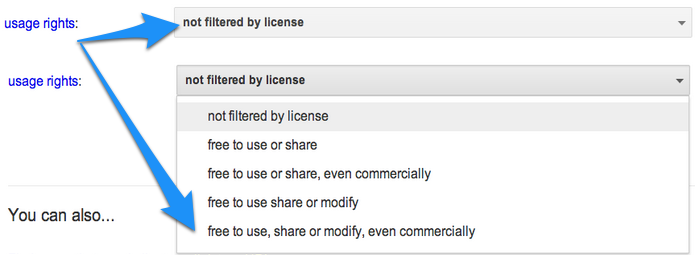
3. Use the drop down to change the usage rights that you are searching for. You may want to choose the most encompassing choice.


4. Click the Advanced Search button.

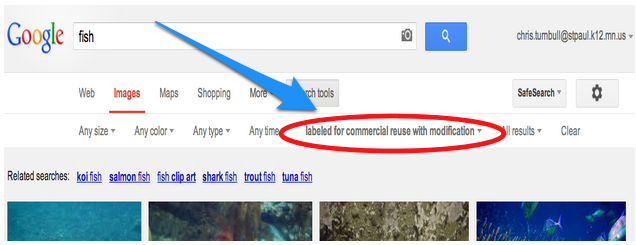
5. Notice that your search results now list the usage rights.


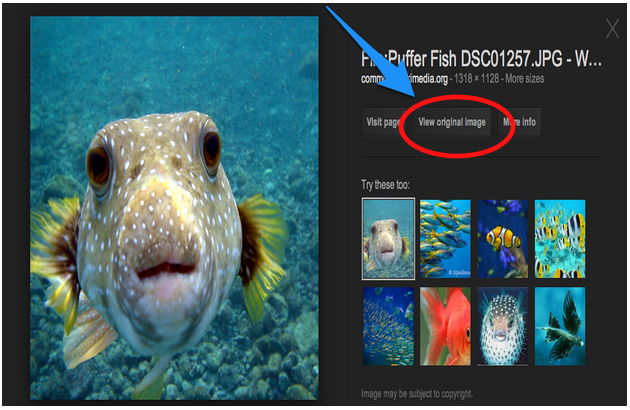
6. Click on the image that you want.


7. Click on the View Original Image button.


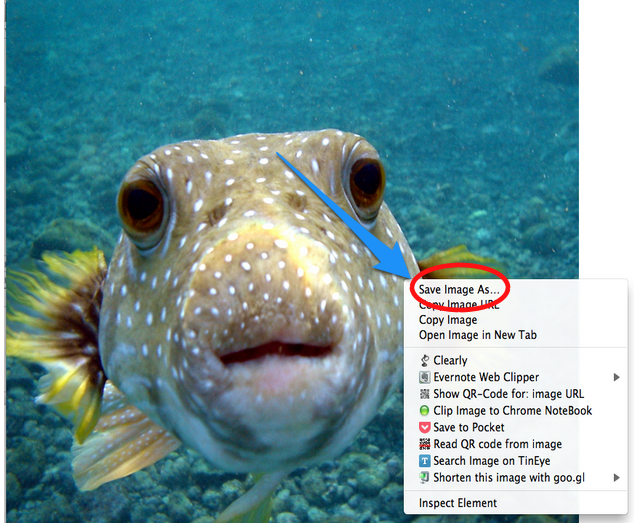
8. Hold the Control button and click on the picture (Mac) or right click (PC) on the picture and choose Save Image As (Chrome and Firefox) or Download Linked File As (Safari) to save the picture to your computer.


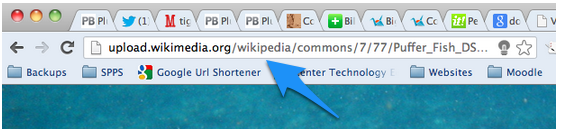
9. Copy the website address (URL) of your image and paste the address into your product to meet the minimum level of citing the source.


Wednesday, May 2, 2012

IRA Presentation - Creative Ways To Publish Student Writing

2012 International Reading Association Conference Presentation 

Giving Students A Global Voice And Connecting One Student To Another With Web 2.0 Tools: Creative and Collaborative Choices For Publishing Student Writing and Creating Authentic Online Reading Sources 

Creative and Collaborative Choices For Publishing Student Writing

Learn how classroom teachers can collaborate with online resources allowing students to share writing with partner schools, get feedback from online buddies, and create literacy materials for others while focusing on improving student writing and reading.
 

Wikis

Wikispaces classroom examples
PBWorks classroom examples
Wet Paint classroom examples


Book Publishing

RealeWriter

http://www.realewriter.com/

UDL Book Builder

http://bookbuilder.cast.org/


GarageBand Podcasts

Video Creation

xtranormal

http://www.xtranormal.com/

Ben Franklin
by: cturnbull

Google Apps


Blogs


Comic Life

http://plasq.com/products/comiclife/mac


Sunday, April 29, 2012

IRA Technology Institute 16

Today I'm very fortunate to be presenting as part of a team at the International Reading Association Conference in Chicago for the IRA Pre-Conference Technology Institute Fostering Literacy with Research-based Instructional Practices and Web 2.0 Technologies. 


As a result, I also get to soak in the knowledge of the other presenters, including Jerome Burg of Google Lit Trips fame!  Jerome talked about the inspiration that led to the creation of Google Lit Trips as part of a Google Teacher workshop.  He also showed how Google Lit Trips enhance reading novels through the 3D features of Google Earth

Saturday, March 3, 2012

Creative Ways To Publish Student Writing

How can you take the writing that students are doing in their writers' notebooks and publish it in ways that will motivate students to keep writing and share their writing with the global community.

Webpage

Urban Planet
Google Sites


RealeWriter
Free mini book creation software
Can do page, text, and picture formatting
Program does page layout for you

Blabberize
Upload a photo, outline the mouth, and copy in text, and create an talking photo.

Creating Radio Shows
Have students write stories first and then create all the sound effects with common objects and record with GarageBand or Audacity.

Wikis

Free online webpages that allow you to set up who has viewing and editing rights

VoiceThread

Create slideshows that allow you and others to annotate photos and add audio comments
Explantion

SPPS Apps/Google Docs

Please click here and take a quick survey.

What is SPPS Apps (Google Docs)? Common Craft Explanation

What is available in SPPS Apps?
Docs
Spreadsheets
Forms
Presentation
Drawing
Mail
Sites
Calendar
Video
Contact List

Click here to create a staff account.

Click here to create a student account.

All secondary student accounts are already set up.
Google users need to be 13 to have an account, so if you teach elementary, you need to get parent permission to set up their accounts.

What is the advantage of SPPS Apps/Google Docs over a USB drive?
Collaboration
Knowing which is the latest copy
Always having access to your documents anywhere there is internet - Big Bang Theory Video
Easy distribution of assignments - paper-free
Allowing students to access work and assignments from any computer
Being able to collect work even if a student doesn't turn it in

Let's try editing a document together.

Sunday, June 20, 2010

ISTE 2010 - Creative and Collaborative Choices for Publishing Student Writing


Learn how classroom teachers can collaborate with online resources allowing students to share writing with partner schools, get feedback from online buddies, and create literacy materials for others while focusing on improving student writing and reading.

GarageBand
Gatorcast

Old-Fashioned Radio Show

RealeWriter
Student book publishing made easy
RealeWriter website
RealeBooks library

XtraNormal
www.xtranormal.com
Text to Video Converter
MakeMovies


Websites

Publishing for a real-world, public audience makes a difference to students.

GoogleSites

Video Creation
iMovie
Windows Movie Maker
Photo Story
PowerPoint
Keynote

Comic Life
Comic book creation software
Interfaces with iLife to tap into your own photo library or import photos

Wikis
Collaborative webpage
Apple Leopard Server Software (OS 10.5 and 10.6)
Wikispaces - free account
PB Works - free account
Wet Paint - free account

Use usernames and passwords to limit access for student protection.

Wikispaces classroom examples
PBWorks classroom examples
Wet Paint classroom examples

VoiceThread
VoiceThread for K-12
Make photos interactive
Annotate
Leave comments
Tap into higher level thinking skills by providing evidence/support for your opinion

Blabberize
Upload a photo and make it talk!
Online Blabberize tool

UDL Book Builder
Book creation template