Friday, May 13, 2022

MNCodes Summit 2022 - The ABCs of a PLC Book Study To Align And Deepen Computer Science Instruction

 Are you interested in learning more about computer science instruction in K-12 classrooms and how unplugged lessons can deepen students' understanding of abstract terms and concepts?


Learn more about how to build teacher knowledge about computer science concepts and align instruction across multiple elementary schools with varying specialist rotation configurations in this poster session of the MNCodes Summit 2022.

Saint Paul Schools elementary technology teachers have been deepening their own computer science knowledge and sharing concrete unplugged lessons and activities to take back to their classes through a monthly virtual PLC book study this school year. 

Find out what book they are reading together, which topics they prioritized to read about first, and top unplugged activities that they are using with their students to build computer science and computational thinking skills.

Presentation Slides


District-wide Elementary Technology Teacher PLC
Since there is usually only one technology teacher in an elementary school in my district, they can choose to participate in an optional district-wide PLC that meets after school for two hours every month with other technology teachers rather than being in a PLC at their school with homeroom teachers or other specialists.  Being in the district-wide PLC allows for lesson sharing, anecdotal lesson data comparison, and exploration of new ideas and resources.

We decided to continue meeting virtually this school year to eliminate travel time and rush for those teaching at late-ending schools. Each school's principal and leadership team decides which grade levels technology teachers will teach and how long each rotation with a grade level will last before switching to another specialist.

Book Study
This year we were able to do a book study as part of our PLC. We decided to read the book Computer Science in K-12: An A to Z Handbook on Teaching Programming by Shuchi Grover to deepen our  computer science knowledge and align instruction across schools. The book provides a nice balance of research and practical classroom suggestions.


Chapter Topics
The chapters in Computer Science in K-12: An A-Z Handbook on Teaching Programming are organized alphabetically by computer science topics. The chapter topics range from algorithms to integrating programming in other subjects to JavaScript to variables and much more.
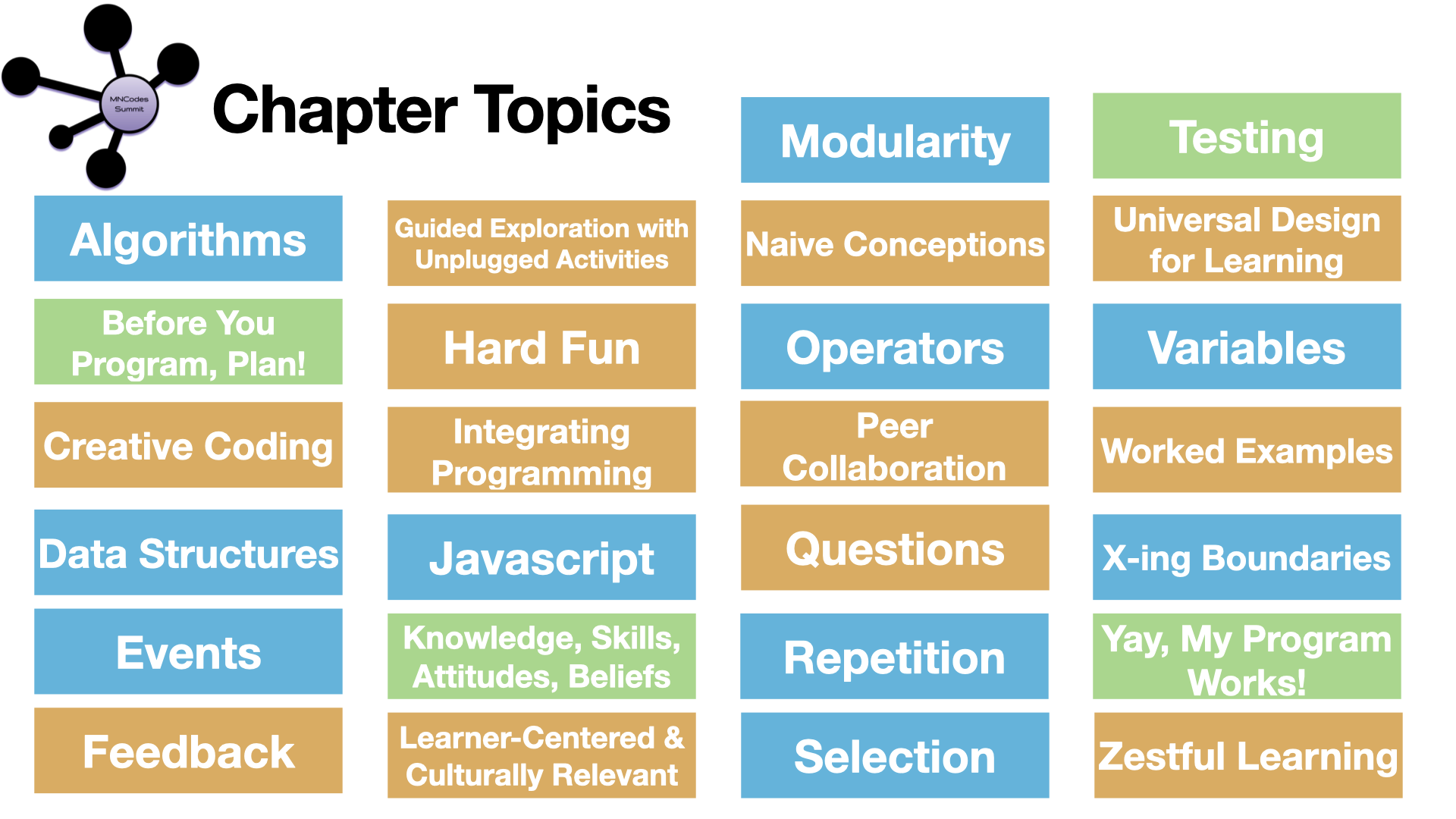
Chapter Types/Categories
The chapter types or categories fall into three distinct groups. Computer science concepts or technical terms, practices or strategies that students might use, and pedagogy or how to teach computer science.

Book Study Reading Overview
Since the chapters are organized by alphabetical topics, they do not need to be read in sequence, which allows for them to be re-organized and read in any order. Although initially we started reading the book chapters in sequential order, we soon prioritized some of the chapters to ensure that we were able to re-read them before the end of this school year.

Focus Chapters Related To District Work
Some of the chapters were also closely aligned with other work that we're doing in my district. The "Integrating Programming in School Subjects" chapter connects with work that we are doing to integrate computer science in the elementary homeroom classes to reinforce content learning and in other subject classes in middle school and high school. The "Learner-Centered and Culturally Relevant Pedagogy" chapter also focused on similar information to the book Culturally Responsive Teaching and the Brain by Zarreta Hammond, which all teachers in our district read this year through book studies at each school.

Unplugged Lesson Resources
The "Guided Exploration Through Unplugged Activities" chapter of the book suggested using unplugged lessons that can be done to introduce abstract computer science topics through practical, concrete activities in the form of familiar games or common everyday activities. After completing the activity, it is important to link the unplugged activity back to the abstract concept or technical term to ensure student understanding of the concept.

Some great resources for finding free unplugged lesson activities include Code.org, CS Unplugged, Barefoot Computing, and the popular Which One Doesn't Belong website wodb.ca which includes thought-provoking puzzles that help to develop computational thinking skills.

MNCodes Summit Session Challenge
If you would like to participate in a fun, mini challenge for the summit, use your favorite app on your computer, phone, or mobile device to create a graphic calling out a letter of the alphabet and the corresponding computer science term or concept. Include the letter of the alphabet, the computer science term, and a related image or definition of the concept. Then post your image on Twitter with the hashtags #MNCodes,  #A2ZK12CS, and @TurnbullChris.


MNCodes Summit 2022 - Get Started With Code Wherever You Are

 If you are interested in K-5 coding curriculum that can be used in-person in the classroom or for virtual or hybrid learning,  join me for the Get Started With Code Wherever You Are poster session of the MNCodes Summit.

Image Source

Learn more about how Apple's Everyone Can Code curriculum helps young coders in K-5 get started with programming and develop coding skills through the fun and interactive iPad, unplugged activities to introduce coding concepts, and block-based coding apps like CodeSpark academy and Tynker.

Everyone Can Code and Develop In Swift Curriculum

Apple has free teacher and student guides available in the Apple Book Store in the Books app on the iPad or Mac computer. The curriculum guides include ways to introduce coding concepts and key vocabulary, activities to help students better understand the concepts by through everyday activities, practice with block-based apps at the elementary level, and reflection activities that allow for using other apps to create multimedia responses that demonstrate student learning.

Learn More About The Everyone Can Code and Develop In Swift Curriculum

Get Started With Code 1 and 2 Teacher Guides


Coding Concepts In The Get Started With Code Guides

Lesson Structure Overview:
Lesson Overview And Key Vocabulary

Lesson Introduction And Kinesthetic Activities

Unplugged Activities
The Get Started With Code guides contain unplugged activities that get students off their devices and up and moving to introduce coding concepts through familiar games and activities to help students understand and remember the concepts.

Lesson Activity
Lesson Practice With Block-Based Coding Apps

Block-Based Coding Apps
Block-based coding apps allow students to learn about coding concepts and practice them in apps without needing to know any coding languages. Students can simply drag and drop the code blocks to create a program.


Tynker
CodeSpark Academy app

CodeSpark Academy
Daisy the Dinosaur app

Daisy the Dinosaur

Lightbot Hour

Kodable

Scratch Jr.

Scratch

Hopscotch

Lesson Reflection And Optional App Design Activity

Lesson Resources

Robots And Physical Computing

Robots With Block-Based Apps

Dash - Blockly app       


Sphero Mini - Sphero EDU app

Blue-Bot - BlueBot app

Resources:
Apple K-12 Education Teaching Code - Curriculum and resources for teaching code.
Apple Teacher Learning Center - Learn about iPads, apps, Mac computers, applications, and integration ideas. Get started earning your Apple Teacher badges.
Google Jamboard - Collaborative online whiteboard. Saves in your Google Drive account.
Google Meet - Video conference application.
Keynote - Apple presentation app for iPads and Apple computers. Awesome for creating presentations, drawing, animation, video, and layout and design.
Padlet - Online collaborative bulletin board application for sharing resources.
PowerSchool Schoology - Learning Management System for hosting courses and groups making it easy for students to find, access, and share materials and learning.
Seesaw - Content Management System for sharing digital messages with families and students and collecting their work from them.

Monday, May 9, 2022

I'm Presenting At The Northeast Mississippi Community College Mobile Learning Conference 2022

   I am excited to share that I will be presenting at NEMCC Mobile Learning Conference on June 13, 2022!


I will be presenting a session on a great topic for anyone in a in-person, distance learning or virtual learning, or online school situation who wants to build students' technology skills.

I am looking forward to sharing some great resources for teachers and students and a model of how to make technology leadership experiences available to students even during distance learning and online school situations.

I hope that you are able to join me for my session on Leveling Up With Student Tech Leaders.

Friday, April 15, 2022

I'm Presenting at MNCodes Summit 2022

   I am excited to share that I will be presenting a poster session at the MNCodes Summit on May 14!

Image Source

How do you build teacher knowledge about computer science concepts and align instruction across multiple elementary schools with varying specialist rotation configurations? Saint Paul Schools elementary technology teachers have been deepening their own computer science knowledge and sharing concrete unplugged lessons and activities to take back to their classes through a monthly virtual PLC book study this school year. 

Find out what book they are reading together, which topics they prioritized to read about first, and top unplugged activities that they are using with their students to build computer science and computational thinking skills.


I hope that you are able to join me.


Thursday, January 6, 2022

I'm Presenting At ISTELive 22

   I am excited to share that I will be presenting at the ISTELive 22 Conference in June!

Image Source - ISTE Presenter


I will be presenting a session on a great topic for any teacher who has students with access to digital learning devices:
  • Level Up Tech Skills With Student Technology Leaders

I am looking forward to sharing some great technology integration resources on a variety of apps and digital tools for teachers and students and a model of how to make technology leadership experiences available to students in the classroom or virtually during distance learning situations.

I hope that you are able to join me!

Sunday, October 24, 2021

FallCUE 2021 - 10 Steps To Host An App Design And Prototype Camp

 Are you interested in learning more about how to host an in-person or virtual summer camp or after school club for students to get them excited about coding and computer science? You can host a club or camp focused on app design and app prototyping in 10 easy steps.


App prototyping is the process of creating a working model of an app. Before spending a lot of time writing the code for an app, you can create a prototype to help you map out the interactivity and features of the app. Essentially creating models of each screen, the features of the app, and demonstrating what happens when you push a button. Does the app go to the camera app, a photo gallery, a data entry tool, or back to the home screen?

I hope you are able to join me to learn more about hosting a summer coding camp or after school club focused on app design and app prototyping as a way to get students excited to learn more about computer science, coding, and app development. You can also integrate smaller pieces of this experience into any content area class to introduce the concept and help students make cross-curricular connections.

In addition to getting students excited about computer science and helping them to be more aware of the app development process, all of the materials that you need to help guide you through the process are completely free from Apple and can be used by anyone, regardless of having any coding experience. Resources are linked below.

Session Description
Learn 10 steps to guide you from start to finish in organizing and holding a virtual or in-person summer camp or after school coding club for students focused on app design and prototyping to build their interest in learning how to code and develop iOS apps. Hear about the process and free resources available to help your students learn more about app design, UI, and UX while prototyping a working model of an app using the Keynote app on the iPad to help solve a problem or challenge in their community. No previous coding experience needed. 

Google Slides and PowerPoint users can follow this process, too.

Presentation Slides


Marketing:
Creating a flyer to get information about the camp out to students, staff, and families is a very important step in the process so that everyone knows about the opportunity. Fortunately there are lots of great tools, apps, and applications that you can use to create your flyer.

I used Keynote and shapes from the built-in shapes library to create the flyer shown below.


Layout and Graphic Design:
Keynote
PowerPoint
Google Slides
Canva
Google Drawings
Adobe Spark

Creating A Balanced Schedule
Think about how much time you want students to spend on the coding activities each time that you are meeting with students to allow for a balance between time spent on devices and times spent moving, outside, or with family doing screen-free activities.


To Code Or Not
If you want to include coding in your app design and prototyping camp, there are lots of ways to do so even if your students have very little or even no previous coding experience. Swift Playgrounds, a free app available on the iPad, is a great way to learn about the Swift coding language by guiding a character through levels and practicing the code in the guide on the left side to see what happens in the viewer on the right side. Scratch is another great option for getting students starting with coding.


Recruiting And Enrolling Students
Use whatever networks that you have available to market your camp and attract and sign up students.


Virtual Learning vs. In-Person Instruction
If you are teaching coding in-person in the classroom, you can skip past this step. If you are teaching students in a virtual learning situation, then you may need to choose a video conferencing application to connect with your students and share your screen. Your district probably already has an approved app, but if not, there are several to choose from.


Make Resources Easy To Find And Return To
Use a learning management system (LMS), website, or other content management system to collect resources that you want to distribute or collect from students to allow them to return to materials and resources and continue working on their app prototypes outside of your camp time.


App Ideas:
Where to start? We had students brainstorm ideas of apps that they thought could help solve problems or challenges in their communities or could help to promote opportunities or resources that  people might not know about.

We used the Google Jamboard app. Padlet would be another great resource for this task too. Both of these apps allow students to add sticky notes to a board to share ideas with others. By using a collaborative community board, students who were still struggling to come up with ideas were able to take inspiration from the ideas shared by others.


Learning About App Design:
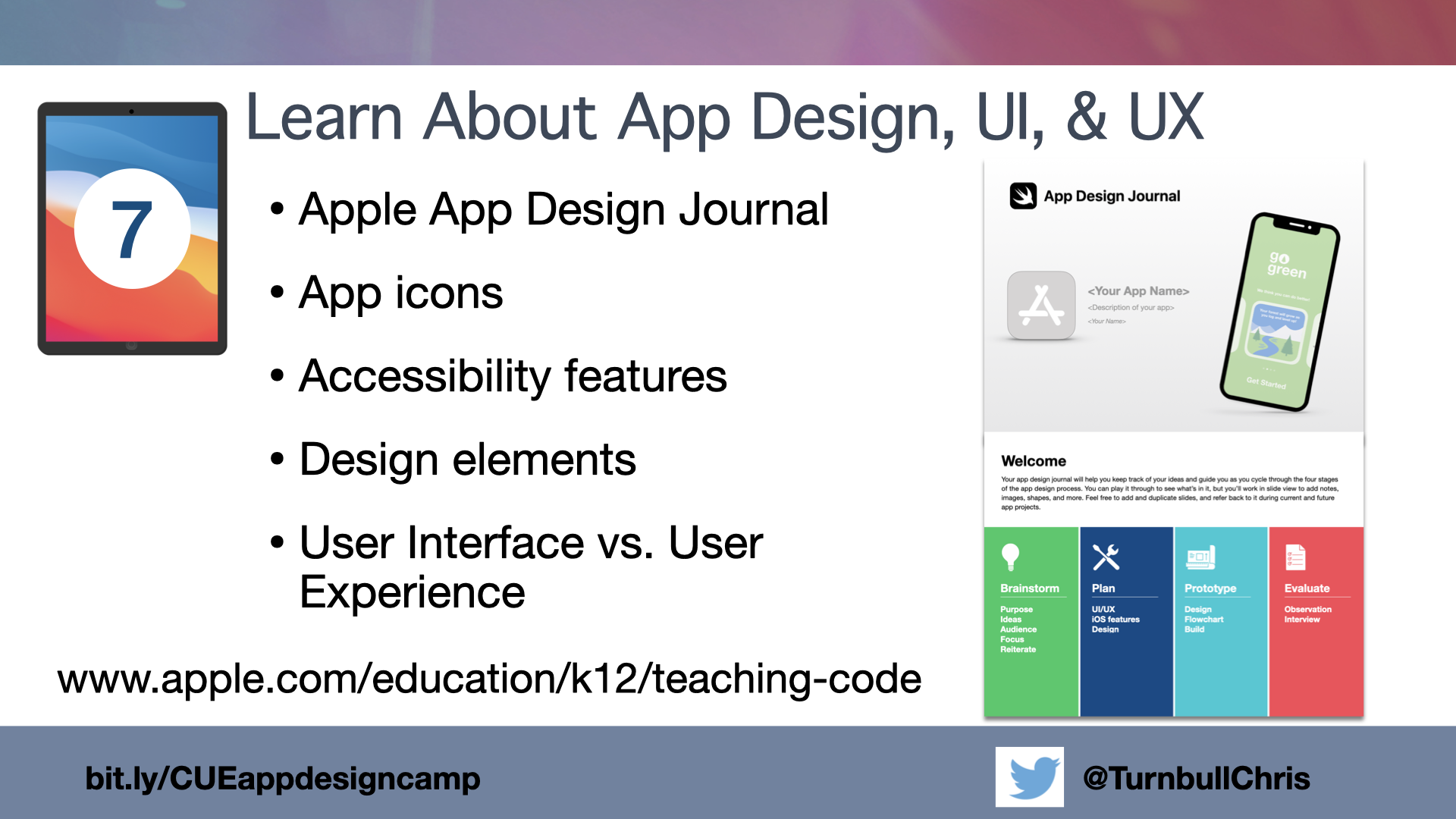
Apple has an awesome App Design Journal that is a Keynote file that guides students through the four stages of the app design process: brainstorm, plan, prototype, and evaluate. The journal is loaded with helpful information and spaces for students to sketch, write, and record their thoughts as they move through the process.


Creating An App Prototype:
Creating an app prototype is very helpful for developers so that they have an overall blueprint for their app, the number of screens they will need to create, and the interactivity that they will need to include in their coding of the app.

The app prototype allows app developers to provide a working model to their potential target audience to get feedback about interest in the app concept, user interface appeal, and user experience in terms of how easy the app is to figure out and navigate as well as potentially missing features that they should include. By observing users navigate their app, developers can proactively debug potential problems or add wanted new features before spending hundreds of hours coding the app.


Apple provides an iPad app prototype and an iPhone prototype in the App Design Journal that students can use as a model to see how each slide represents a screen in the app and how the buttons control the navigation when the slide show is run rather than just advancing to the next slide.
iPad App Prototype Provided In App Design Journal


Building Interest - Creating A Good Pitch Statement: 
Having a short, attention grabbing app pitch to get potential users interested in your app and convince them why your app stands above competitors is just as important as having great UI and UX.

FlipGrid works really well for students to record both audio pitches and record their screens to demonstrate app functionality. Recordings can be limited to the amount of time that students will have to present their apps to help them to become more fluent through repeated practice. Best of all, students can watch and listen to their own recordings to get an objective sense of how they did and what parts they need more practice on before pitching their app to others.


Celebrating Student Success:
Holding an app showcase provides the opportunity to give students some public recognition of their hard work and to share their app prototype with a panel of knowledgeable judges who can give students some short feedback and tips on how to make their prototypes even better.

Apple provides an App Showcase Guide that can be used by organizers and judges to help guide organizing the showcase and giving feedback to students.


Keep The Interest Going:
Follow up on your camp and the showcase by creating elective computer science courses using the Everyone Can Code and Develop in Swift curriculum available for free from Apple in the Books app to open new doors, pathways, and worlds for your students as they develop their skills and interests in computer science.


Resources:
Apple K-12 Education Teaching Code - Curriculum and resources for teaching code.
Apple Teacher Learning Center - Learn about iPads, apps, Mac computers, applications, and integration ideas. Get started earning your Apple Teacher badges.
App Design Journal - Keynote file students can use to guide them through the app design and app prototyping process.
App Showcase Guide - Tips, suggestions, and steps to hosting an app development or app prototyping showcase.
Google Meet - Video conference application.
Google Jamboard - Internet-based collaborative whiteboard. Great for collaborative brainstorming. Saves in your Google account.
Keynote - Apple presentation app for iPads and Apple computers. Awesome for creating presentations, drawing, animation, video, and layout and design.
PowerSchool Schoology - Learning Management System for hosting courses and groups making it easy for students to find, access, and share materials and learning.