Monday, June 29, 2015

ISTE2015 Workshop - Publish Amazing Interactive Books With iBooks Author

iBooks Author is free software from Apple for creating interactive multi-touch books for the iPad or iBooks on the Mac.


Required:
Mac computer
iBooks Author
iBooks (on Mac) - optional
iPad  - optional
iBooks (on iPad) - optional

Resources:
In addition to the sample Philadelphia book and the workshop instructional packet, the following resources may be helpful.

Creative Commons Licensed Images
Morgue File
Wylie Image Search
World Images
Animal Photos
The Noun Project
Google Images Advanced Search - Free to Use and Share

Video
Format - MP4

Other Widget Creation Tools
Bookry
BookWidgets
iAD Producer
Tumult Hype


File Types
iba - editable iBooks Author file
ibooks - finished book - cannot be edited

Distribution
Dropbox
Website
iTunes - with iTunes Producer
iTunes U

Other Book Creation Tools
Book Creator App - Easily create multimedia ebooks on the iPad.

ISTE2015 - Poster Session - 30+ Ways To Use Your iPad For Personalized Professional Development


Are you looking for free or low cost professional development opportunities? Do you have an iPad? You can use several apps to find the content to create your own personalized professional development.


Resources:
I listed the apps below in categories of how the apps can be used for personalized professional development. Most apps are free but there are a few that are not but they do something really well that makes them worth the cost.

Record Yourself and Others 
(With Permission - Some conferences and presenters do note allow recording) 
Camera
iMovie
YouTube Capture

Record Your Voice
GarageBand
Recorder


Collect Artifacts
Camera
Photos

Create Podcasts
GarageBand
TouchCast
Adobe Voice
Camera
iMovie
DoInk
Tellagami
Tellaprompter

Capture Your Learning - Take Notes
Notes
Pages
Evernote
Google Docs
Notability
GoodNote
Microsoft Word
Penultimate
Moleskine

Create and Expand Your PLN (Personal Learning Network)
Twitter
Hootsuite
Voxer
FaceBook
Google+

QR Code Readers
QR Code Reader by Scan
Qrafter

Curate Resources
FlipBoard
Scoop.It
Pocket
Slideshare
Pinterest
Learnist
Instapaper
YouTube
iTunes U
Pearltrees

Create Publications
Pages
Book Creator
iBooks Author (On Your Mac)

Professional Reading
iBooks
Kindle

Expand Your Skill Set
YouTube
iTunes U
Tips app
Drippler
Simple K12
Lynda.com
Udemy.com

Create Professional Development Resources
iTunes U
Blogger
Zaption

Connect and Learn
FaceTime
Skype
Google Hangouts
BlackBoard Collaborate
WebEx
Adobe Connect
FlipGrid

Collect and Organize Your Learning
Evernote
Penultimate
OneNote
Notability
GoodNotes
Paperport Notes
Google Drive
Google Docs
Google Slides

Organize Your Thoughts
Inspiration
Padlet
Lineoit
Sticky Notes
Total Recall
Popplet

Organize and Transfer Resources
Google Drive
Box
Dropbox

Inspire Yourself
YouTube
TED

Create Presentations
Keynote
Google Slides
Haiku Deck
Prezi
Microsoft PowerPoint

Track Your Time
Timer
Do Now Then

Health and Well-being
Health
Hydrate
Waterlogged
Pedometer

Illustrate Your Ideas
Notability
GoodNotes
Paper 53
Adobe Draw
Tayasui Sketches

Blog - Reflect On Your Learning
Blogger

Schedule Your Time
Calendar
Google Calendar

Explain - Create Screencasts
Educreations
Skitch
Explain Everything
30Hands
Doceri
Reflector
QuickTime (On Your Mac)
ShowMe
ScreenChomp
Stage
Knowmia Teach
TechSmith Fuse

Expand Your Programming Knowledge
Scratch
Hopscotch

Collaboratively Brainstorm
Baiboard

Create Flyers and Infographics
Keynote
Canva

Relax
Metronome
Zen Garden

Reminders and Task Lists
Remember The Milk
2Do

PDF Annotations/Scanning
PDF Scanner
Cam Scanner
iAnnotate PDF
Tiny PDF
Notability
GoodNotes
Paperport Notes
Skitch

Siri
Search internet
Answer questions
Take notes and reminders

Accessibility Settings
Screen zoom
Screen brightness
Font size
Color contrast
Text to speech

Presenting
Reflector is a must-have app for your Mac computer if you are presenting on an iPad. Reflector mirrors your iPad screen to your computer, allowing you to move around without any VGA or HDMI cables attached to your iPad.


Saturday, June 27, 2015

ISTE Ignite Session

Doing some final review work on my ISTE 2015 Ignite session tonight to get ready for tomorrow's ISTE Ignite session.

"Enlighten us, but make it quick!" ~ Ignite motto

As an Ignite Speaker, I am hoping to highlight some of the great work that teachers in my district are doing with instructional technology and how they are engaging students in real world work and activities. I am so proud of our teachers and the work they do to make academic content interesting, engaging, and valuable for our students.

Thursday, June 18, 2015

Fourth Annual Minnetonka Technology Institute Presentation - Making Learning Visible With The iPad

Thank you to everyone who attended my sessions today on Making Learning Visible With The iPad at the Fourth Annual Minnetonka Technology Institute.

Resources
Apps featured:
Educreations Interactive Whiteboard
50 MB storage

ShowMe Interactive Whiteboard
1 hour video storage - 1GB monthly bandwidth

ScreenChomp

Skitch

Adobe Voice

Paper  by FiftyThree

Book Creator Free

Examples:
Educreations
Ocean Floor - Techtonic Plates

2nd Grade Perimeter Estimation


ShowMe
Drawing An Eye

Max's Fish Measuring


Screen Chomp
Chemistry

Converting to Decimals

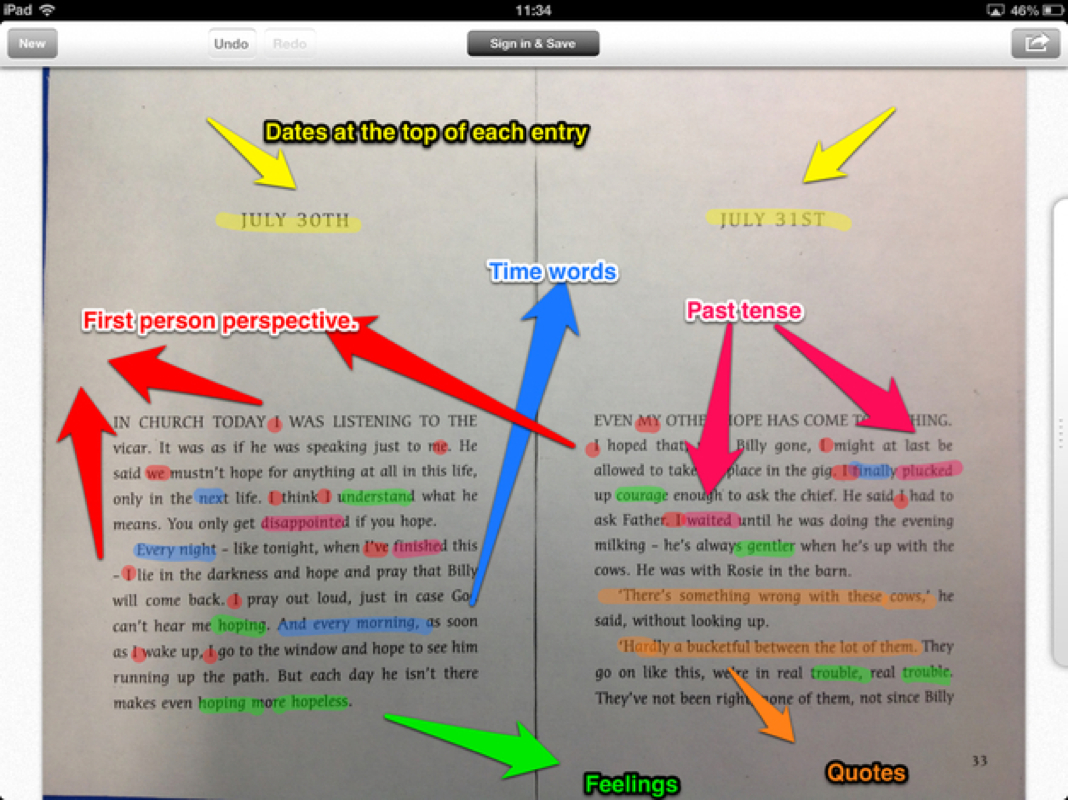
Skitch
Features of a Journal Entry
http://5tanfieldlea.weebly.com/uploads/7/9/1/2/7912840/4446148_orig.jpg

Parts of an Insect
Adobe Voice
Text and Bullying

Paper by FiftyThree
Multiple Intelligences

Statistics - Normal Distribution

3rd Grade Rainforest

Book Creator
Space - Saved as a video


Sunday, May 31, 2015

FlipCon15 PreSession Work - Creating Flipped Lessons On and For the iPad

I will be presenting a poster session at the 8th Annual Flipped Learning Conference this summer on Creating Flipped Lessons On and For the iPad.

Image Adapted From Source

Please share your expertise and help me crowd source some ideas about iOS apps, applications, and Web 2.0 tools that teachers use to create instructional lessons and materials for use on the students' iPads as well as iOS apps and Web 2.0 tools that students can use on the iPad to demonstrate their learning!

I don't know how many times I have been at a conference and heard that no one is smarter than the room.  Too often I think we try to recreate the wheel rather than tapping into the collective knowledge that already exists.

For one of my sessions at the upcoming FlipCon15 Conference, I would like to put the crowd sourcing concept into practice. Whether you will be going to FlipCon15 or not, if you have any experience with flipped learning or using iPads with students in the classroom, please take the short survey below and share your expertise.


FlipCon15 PreSession Work:
Please complete the following PreSession Work:
1. Complete the short survey below.
2. Think about which Web 2.0 tools, and applications teachers can use to create flipped instructional lessons and resources and which apps and Web 2.0 tools students can use to demonstrate their learning.

Crowd-sourced results from survey and tutorial videos will be shared during session at FlipCon15. Bring an iPad and come prepared to discuss apps and share ideas! 

If you are not attending FlipCon15, you can check back on this blog later for links to results spreadsheet and tutorial videos.

Tuesday, May 19, 2015

ISTE Ignite Speaker

I have been chosen to be an ISTE 2015 Ignite Session Speaker for the ISTE 2015 convention in Philadelphia.


"Enlighten us, but make it quick!" ~ Ignite motto

It looks like I will be really busy at ISTE this year as I was just chosen to be an Ignite Speaker at the beginning of the conference on Sunday afternoon.

My topic will be "How the iPad Transports Students Through Time and Space."

The Ignite format allows the speaker only 20 slides and requires that the slides advance every 15 seconds, making for a rapid-fire presentation designed to ignite or excite people about a topic in a short amount of time. I'm looking forward to the challenge as I have not done a presentation that follows this format previously and it seems like it will be fun!

Wednesday, April 22, 2015

Presenting at Minnetonka Technology Institute

I will be presenting at the Minnetonka Technology Institute on June 18.
Image Source

I will be presenting a session on Making Learning Visible with the iPad at the Minnetonka Technology Institute and will focus on how to use a variety of free and low cost screencasting apps on the iPad that can be used to make teacher instruction more visual for learners and student learning more visible for teachers and parents.

I'm looking forward to networking and connecting with colleagues and educators interested in using iPads in the classroom to enhance and support student learning.